RadListView Header and Footer
RadListView can be configured to display two special kinds of elements at the beginning and at the end of the data item list: a header and a footer respectively. The contents of these elements are defined in a similar manner to the way content of standard list items is defined - via templates. For that purpose RadListView exposes the following properties:
Here's a simple example of how these properties are used:
Example 1: Defining a header and a footer for RadListView in XML:
 <lv:RadListView.headerItemTemplate>
    <Label text="This is list header" backgroundColor="#65a565"/>
</lv:RadListView.headerItemTemplate>
<lv:RadListView.footerItemTemplate>
    <Label text="This is list footer" backgroundColor="#7fff7f"/>
</lv:RadListView.footerItemTemplate>
The views generated using the values of
headerItemTemplateandfooterItemTemplatehave access to the binding context ofRadListViewso you can bind their properties to values exposed by your business object assigned as a binding context.
Assuming that we're using the following view-model setup:
Example 2: Using a model to define the header and footer content:
import { ObservableArray } from "tns-core-modules/data/observable-array";
import { Observable } from "tns-core-modules/data/observable";

export class ViewModel extends Observable {
    constructor() {
        super();
        this.footerTitle = "This is list footer";
        this.headerTitle = "This is list header";
        this.dataItems = new ObservableArray<DataItem>();
        for (let i = 0; i < 5; i++) {
            this.dataItems.push(new DataItem(i, "Item " + i, "This is item description."));
        }
    }

    get dataItems(): ObservableArray<DataItem> {
        return this.get("_dataItems");
    }

    set dataItems(value: ObservableArray<DataItem>) {
        this.set("_dataItems", value);
    }

    get headerTitle(): string {
        return this.get("_headerTitle");
    }

    set headerTitle(value: string) {
        this.set("_headerTitle", value);
    }

    get footerTitle(): string {
        return this.get("_footerTitle");
    }

    set footerTitle(value: string) {
        this.set("_footerTitle", value);
    }
}

export class DataItem {
    public id: number;
    public itemName;
    public itemDescription;

    constructor(id: number, name: string, description: string) {
        this.id = id;
        this.itemName = name;
        this.itemDescription = description;
    }
}
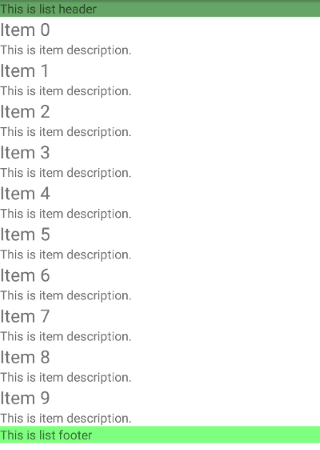
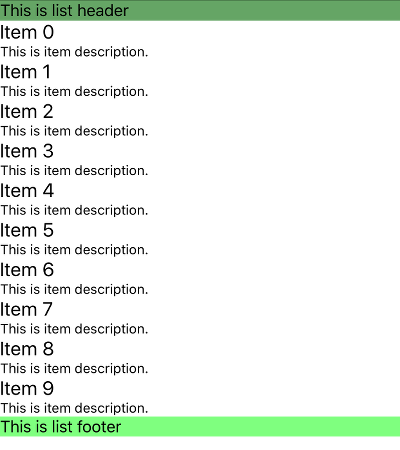
Here's how the list looks like:
Fugure 1: RadListView's header and footer in action:
References
Want to see this scenario in action? Check our SDK examples repo on GitHub. You will find this and many other practical examples with NativeScript UI.